

Social Media for Contractors: What to Post, Where, and How Often

Rob Petruccello
Fresh Bread Digital
Social media for contractors works best as proof, not as a lead machine. Homeowners rarely find a roofer or plumber by scrolling. They find you on Google, then check your Facebook or Instagram to see if you are real, local and busy. A feed of finished jobs wins that check. Paid social ads generate the leads.
This guide covers which platforms are worth your time, what to post, how often, where paid ads fit, what it costs, and how to tell whether it is working. It is written for home service and trade contractors.
On This Page
What Social Media Actually Does for a Contractor
Most social media advice is written for businesses people follow for fun. Nobody follows a septic company for entertainment. For a contractor, social media has three practical jobs.
1. It Passes the Trust Check
A homeowner who has never heard of you reads your reviews, and then keeps looking. In BrightLocal’s 2026 Local Consumer Review Survey, 66% of consumers said they do more research after reading positive reviews. More than half (54%) visit the business’s website, and 24% visit its social media channels.
A page with last week’s bathroom remodel says the business is active. A page whose last post is from two summers ago says the opposite, even if the work is excellent.
2. It Keeps You Familiar Between Jobs
Most people do not need a roofer today. They will need one after the next hailstorm. Every post a past customer or neighbor scrolls past is a small reminder of your name and your work, so when the need shows up the call goes to you instead of to a search.
3. It Feeds the Rest of Your Marketing
- Posts on your Google Business Profile show up on your listing in Search and Maps.
- Anyone who taps your name on an ad lands on your page. An active one makes the ad believable.
What it does not do is produce emergency calls. Someone with a burst pipe opens Google, not Instagram, which is why social sits behind search in our guide to digital marketing for service businesses.
Think of your social profiles as a job-site sign that follows people home. It rarely creates the need, but it decides who they think of when the need shows up.
Which Platforms Matter (and Which Can Wait)
You do not need to be everywhere. Start where your customers already are.
| Platform | Who is there | Best use for a contractor | Priority |
|---|---|---|---|
| 71% of U.S. adults, 80% of ages 30 to 49 | Business page, reviews, local groups, paid ads | Start here | |
| Google Business Profile | Anyone who searches your name or trade | Updates, offers and photos on your Search and Maps listing | Start here |
| 50% of U.S. adults, skewing younger | Before-and-after portfolio, short video | Start here if your work is visual | |
| Nextdoor | More than 110 million verified neighbors (company figure) | Neighbor recommendations, free business page | Add next |
| YouTube | 84% of U.S. adults | How-to and project videos, Shorts | Add when you can film regularly |
| TikTok | 37% of U.S. adults, daily use concentrated under 30 | Short job-site video, recruiting | Optional |
| Property managers, builders, business owners | Commercial and B2B work | Only for commercial work |
Sources: Pew Research Center, “Americans’ Social Media Use 2025” (5,022 U.S. adults, February to June 2025) and Nextdoor’s second quarter 2026 results.
Facebook is still the default for home services. Pew found that 71% of U.S. adults use it, and that more than half of adults between 30 and 64 open it every day.
It is also a review site. In BrightLocal’s survey, 34% of consumers had left a review on Facebook in the past year, second only to Google at 45%. Treat your page as a second homepage: recent job photos, a pinned post with your main offer, and a reply to every recommendation and message. Keep the business name, address and phone number identical to your other listings, for the reasons in why local citations matter.
Google Business Profile
It is not a social network, but for a contractor it matters more than any of them. Google lets you publish updates, offers and events that appear on your profile in Search and Maps. Its help documentation notes that posts older than six months are archived unless a date range is set, so a profile needs fresh posts to look alive. Reuse what you post on Facebook. The rest is in our guide to ranking higher on Google Maps.
Instagram is a portfolio. Half of U.S. adults use it, though Pew found the share drops to 19% among adults 65 and older. It matters most for trades with visual results, such as remodeling, landscaping, painting and roofing. Before-and-after carousels and short Reels do most of the work.
Nextdoor
Nextdoor is organized by neighborhood, and one of its main uses is neighbors asking each other who to hire. The company reports more than 110 million verified neighbors and 22.9 million weekly active users as of mid-2026. Claim the free business page and ask happy customers to recommend you there.
YouTube and TikTok
Every major platform now has a short vertical video format, and a phone is enough to make one. A 45-second clip explaining why a breaker keeps tripping can go to YouTube Shorts, TikTok, Instagram Reels and Facebook from the same file.
If you are doing this yourself, pick three: Facebook, Google Business Profile, and either Instagram or Nextdoor. More channels only make sense when a tool or a team is publishing each post for you.
What to Post: 8 Post Types That Work
Contractors have an advantage: the work is visible, and every job is new content.
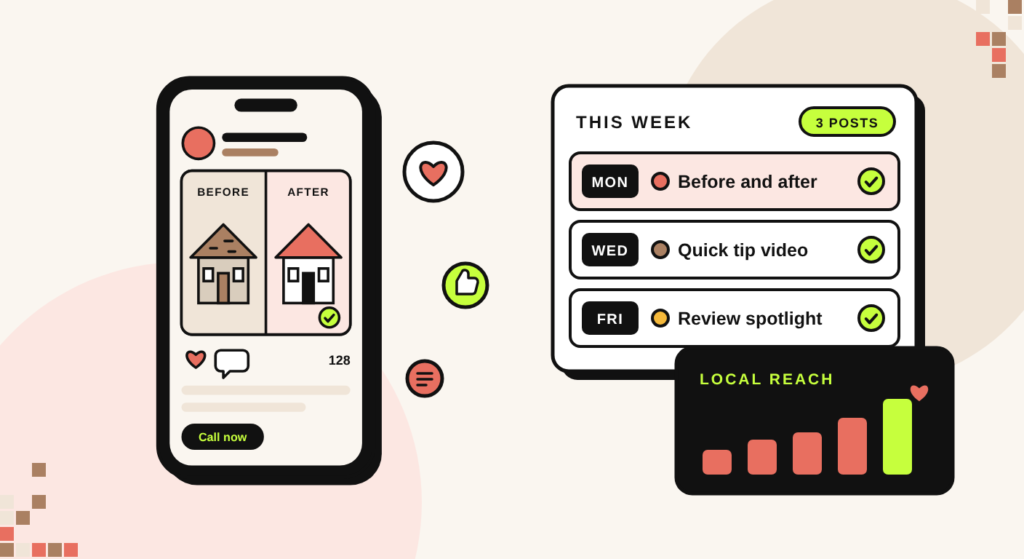
- Before and after. The most persuasive thing a contractor can show. One line on what was done and where.
- Job in progress. The tear-out, the rough-in, the crew on the roof. It shows you are busy right now.
- Meet the crew. People hire people they recognize.
- Quick tips. How to shut off the water main, when to change a filter.
- Review spotlights. A quote from a recent review, with a thank-you. If you need more to share, start with how to get more Google reviews.
- Seasonal reminders and offers. Tune-ups before summer, gutter cleaning before fall. Put dates on every offer.
- Answers to common questions. What it usually costs, how long it takes, whether a permit is needed.
- Community posts. The team you sponsor, the local event you worked.
A Simple Weekly Calendar
| When | Post | Where it goes |
|---|---|---|
| Monday | Before and after from last week’s best job | Facebook, Instagram, Google Business Profile |
| Wednesday | Quick tip video, 30 to 60 seconds | Facebook, Instagram Reels, YouTube Shorts, TikTok |
| Friday | Review spotlight or crew photo | Facebook, Instagram, Google Business Profile |
| Once a month | Seasonal offer with start and end dates | Google Business Profile offer post, Facebook, Nextdoor |
Three rules make it work better:
- Use real photos. A phone picture of your own job beats a perfect stock image of someone else’s.
- Ask before you post a customer’s home. Get a quick yes by text, and keep house numbers and license plates out of the frame.
- Say what and where. Naming the neighborhood tells nearby homeowners you work in their area.
Make collecting content part of the job: one photo on arrival, one before the truck leaves.
How Often to Post
Most advice on social media for contractors gives a posting schedule with no evidence behind it. We have not found a contractor-specific study, so here is the best general data. In 2025, Buffer analyzed 2.1 million posts from about 102,000 Instagram accounts. Accounts posting 3 to 5 times a week grew followers at roughly twice the rate of those posting once or twice (a 0.26% growth rate against 0.12%) and got about 12% more reach per post. Weeks with no posts at all showed below-average growth.
That data covers every kind of account, so treat it as direction and not a promise. For a contractor:
- Three posts a week, every week, is a strong baseline. It is where the biggest jump in reach showed up.
- Consistency beats volume. A silent month costs more than a slow week, and filler teaches followers to scroll past you.
- Reply the same day. A fast answer to a comment or message is part of the schedule.
Organic Posts vs Paid Social Ads
Organic posts reach people who already follow you, plus some of their friends and neighbors. That builds trust over months. If you want leads from social media on a schedule, that is a job for paid ads, which can produce quote requests within days of launch.
Paid social works for services people plan, not emergencies: lighting, irrigation, remodeling, fencing and maintenance plans. You show homeowners in your service area the finished result and let them request a quote in the app.
Across the four Meta Ads campaigns in our published case studies, cost per lead ran from $16.63 to $27.71. In one, a permanent outdoor lighting installer in Central Texas received 201 homeowner leads in 30 days at $20.74 each on $4,168 of ad spend, from September 11 to October 10, 2026. Those are examples, not guarantees.
A lead is only worth something if someone calls it back quickly, so pair ads with fast follow-up such as a missed-call text-back. For how social ads compare with search, read SEO vs PPC vs social media ads, or see our guide to paid advertising for service businesses.
What It Costs in Time and Money
There are three ways to get it done, and each one fails for a different reason.
- Do it yourself. Free apart from your time. Plan on about an hour a week. It fails when the busy season arrives and posting stops.
- Give it to someone on the team. An office manager can run it well if it is written into the job. It fails when it is “whenever you have a minute.”
- Hire it out. Pricing depends mostly on how much original photo and video is included. As a reference point, our own plans are on the pricing page: Social Media Starter is $497 a month for 3 posts a week on every channel, built from your existing photos and video, and Social Media Growth is $1,294 a month for 7 posts a week plus a monthly on-site content day. It fails when the posts could belong to any company in any city.
How to Tell If It Is Working
Likes are not the goal. These are the numbers worth checking once a month:
- Profile visits and website clicks from each platform, found in its built-in insights.
- Calls, messages and form fills that came through social, using tracked links or simply asking.
- “How did you hear about us?” asked on every call and written down.
- Reach inside your service area, not total followers.
Give organic social a full quarter of consistent posting before you judge it. Paid campaigns can be judged sooner, on cost per lead and booked jobs. The setup is covered in how to track marketing ROI for a service business.
Six Mistakes Contractors Make
- The ghost-town profile. A page with no posts since last year suggests a business that may not answer the phone either.
- All promotion, no proof. Show the work, then make the offer.
- Stock photos. They suggest you have no jobs to show.
- Too many platforms. Three active profiles beat seven abandoned ones.
- Ignoring comments and messages. An unanswered message is a missed call that everyone can see.
- Treating social as a replacement for Google. Your Google profile and your website still do the converting. Check the site against our list of what a contractor website should include.
Frequently Asked Questions
What is the best social media platform for contractors?
For most residential contractors, Facebook comes first because 71% of U.S. adults use it and it doubles as a review and recommendation site. Pair it with regular posts on your Google Business Profile, then add Instagram if your work is visual or Nextdoor if neighbor referrals drive your business.
How often should a contractor post on social media?
Three posts a week on each main platform is a solid baseline. A 2025 Buffer analysis of 2.1 million Instagram posts found that accounts posting 3 to 5 times a week grew followers about twice as fast as those posting once or twice. Choose a pace you can keep up all year.
Does social media actually generate leads for contractors?
Organic posts mostly build trust and keep you top of mind, so the lead usually arrives later through a call, a Google search or a referral. Paid social ads generate leads directly and work best for planned services such as remodeling, irrigation, lighting and maintenance plans. Emergency work is still won on Google.
What should a contractor post on social media?
Post proof of real work: before-and-after photos, jobs in progress, short tip videos, crew introductions, customer reviews, seasonal reminders and answers to common questions. Use your own photos instead of stock images and name the city or neighborhood.
Should a contractor hire someone to manage social media?
Hire help if posting has stalled for more than a month or nobody on the team owns it. Doing it yourself takes about an hour a week. An agency or an in-house hire makes sense when you want consistent posting on several platforms, original photo and video, or paid ads managed alongside it.
Start With Proof, Then Add Reach
Social media for contractors will not replace Google, and it does not need to. Its job is to make the people who find you choose you, and to keep past customers thinking of you first. Pick three platforms, post real work three times a week, answer every message, and add paid ads when you want leads on a schedule.
Fresh Bread Digital plans, creates and publishes social content for service businesses across the San Antonio to Austin corridor, from social media marketing in New Braunfels to paid Meta campaigns and the follow-up that turns leads into booked jobs. Book a strategy call and we will review your profiles and show you what to fix first.
Ready to stop losing jobs to your competitors?
Let's build a custom growth plan for your business. We'll show you exactly how to get 10-20 more jobs every month.
Get My Free Growth Plan →Grow Your Business With Fresh Bread Digital
Ready to turn these insights into real results? Explore the services that make it happen.
More in Digital Marketing
Related Articles


Stop watching competitors win the jobs that should be yours.
Book a free 30-minute strategy call. We'll show you exactly how to add 10–20 jobs/month — even if you've been burned by agencies before.
Contact Information
Phone
Hours
Mon–Fri, 8:00 AM – 5:00 PM CST